Build a First-Half Goals Prediction App With ChatGPT: A Step-by-Step Gambling Nerd Guide
A team can win comfortably without scoring before

A team can win comfortably without scoring before half-time. Another can struggle for results while regularly playing first halves full of chances. If you are researching first-half goals, the final score only tells part of the story.
Footballzz’s first-half goals predictions provide a starting point for exploring this market. Building your own research app lets you take the next step: organise historical results, explain your calculations and check whether your forecasts improve on a basic benchmark.
This Gambling Nerd guide explains how to use ChatGPT to build that app, one feature at a time. The focus is over 0.5 first-half goals, meaning at least one goal in the first half, including its stoppage time.
The interface previews below use fictional teams and figures to demonstrate the process. They are design mockups, rather than screenshots of a live prediction service.
Step 1: Give the App One Clear Job
Start with one league and one market. The Premier League is a practical option because historical datasets containing half-time results are available.
Your first version needs to select a fixture, examine each team’s relevant historical matches and calculate an experimental first-half goals estimate. A prediction journal will then help you test it.
Keep ChatGPT’s role clear. It helps write and troubleshoot the software. The app’s probabilities should come from a defined calculation using imported data.
Open a new ChatGPT conversation and explain that you want to build a beginner-friendly football research app called First-Half Goals Lab. Its purpose is to estimate the probability of over 0.5 first-half goals for a selected fixture.
Ask ChatGPT to create one self-contained HTML file with embedded CSS and JavaScript, using no external libraries or paid APIs. This keeps the initial setup manageable: you can save the file and open it in a browser.
Describe the five sections you need: fixture selection, CSV import and validation, home and away first-half profiles, an explained probability and odds comparison, and a prediction journal. Tell ChatGPT to build the interface and navigation first, leaving the calculations for later steps.
Also specify that fictional demonstration data must remain clearly labelled and separate from imported results. The app should never invent real fixtures, scores or odds.
Ask for instructions on saving and opening the file. Save the returned code as first-half-goals.html using a plain-text editor, then open it in your browser. Check that the navigation works before adding more features.
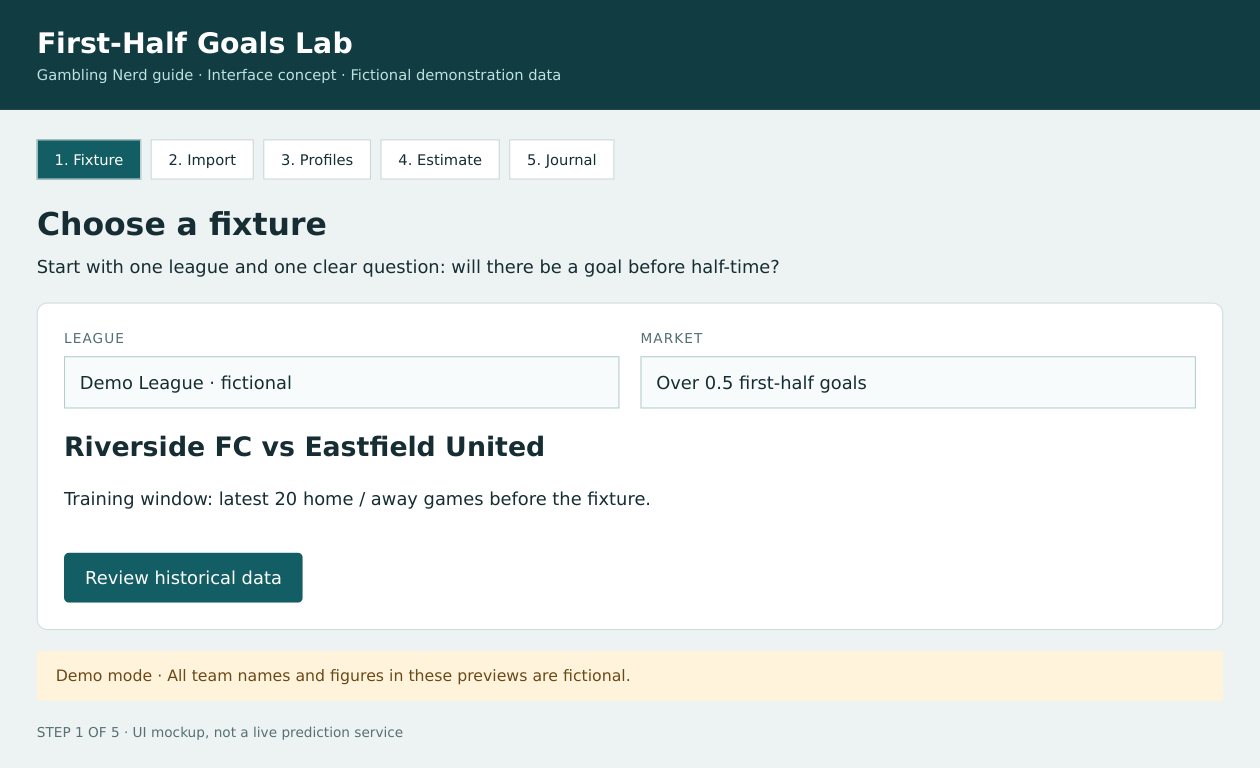
The opening screen keeps the fixture, market and historical window visible.
Step 2: Import Results That Include Half-Time Scores
A first-half model needs first-half data. Dividing full-time scoring averages by two assumes goals are distributed evenly between the halves, which your app should not take for granted.
Football-Data’s English results archive offers season CSV downloads containing full-time and half-time results. Its accompanying notes explain the column headings.
For this project, the essential fields are:
| Field | Meaning |
|---|---|
| Date | Match date |
| HomeTeam | Home team |
| AwayTeam | Away team |
| HTHG | Half-time home goals |
| HTAG | Half-time away goals |
Download a completed season’s file. Keep a copy unchanged so you can return to the original if an import goes wrong.
Return to the same ChatGPT conversation and ask it to add CSV importing to the existing app. Name the five required fields and request a parser that handles quoted fields correctly. Explain the source’s date format and ask the app to convert dates into a consistent year-month-day format.
Before accepting an import, the app should display a preview so you can confirm that each column has been mapped correctly.
Ask ChatGPT to reject missing half-time scores, negative goals, non-integer goals, invalid dates and duplicate fixtures. Explicitly tell it that blank score cells must never become zero.
That distinction matters. A blank score means the result is unknown. A recorded 0–0 means the first half finished without a goal.
Next, establish the historical cutoff. For a selected fixture, the app should use only completed matches from earlier calendar dates. Excluding same-day results is a cautious starting rule when the dataset cannot establish exactly when those results became available.
Ask the import screen to display the source URL, download date, accepted row count and excluded row count, with reasons for exclusions. Request the complete updated HTML file so you can replace your earlier version without manually combining fragments.
Before proceeding, compare several imported rows with the original CSV. If dates or team names look wrong, fix the import first.
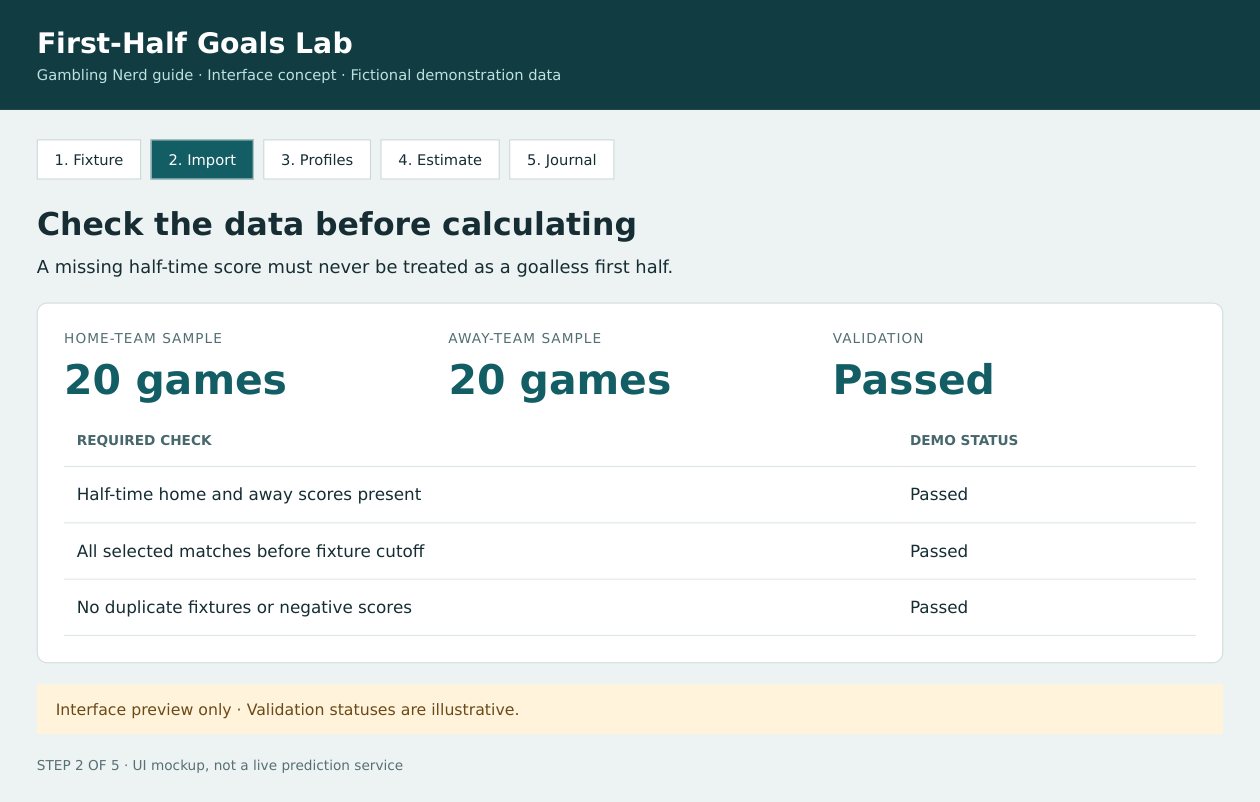
The validation screen explains what the app checked. These example statuses are illustrative.
Step 3: Build Separate Home and Away Profiles
For the home team, examine its previous home matches. For the away team, examine its previous away matches.
A team’s overall record can conceal differences between the two settings. Separating them also makes the calculation easier to inspect.
Ask ChatGPT to build profiles using each team’s latest 20 eligible matches in the relevant setting: home fixtures for the home team and away fixtures for the visitor. All must fall before the selected fixture’s historical cutoff.
For each profile, request the match count, date range, first-half goals scored and conceded, and the corresponding per-match averages. Also include the number and percentage of matches containing at least one first-half goal.
Tell ChatGPT to label those percentages as historical frequencies. They describe previous results; they are not automatically probabilities for the next match.
Use 20 matches as an initial window, rather than treating it as an established optimum. Ask the app to warn when fewer than 20 are available and withhold its estimate when either profile has fewer than ten. These are practical prototype settings, not statistically validated thresholds.
Keep leagues separate and show which seasons contribute to each profile. Request the complete updated file after these features are added.
Consider the fictional example used in our previews.
Riverside FC scored 16 first-half goals and conceded ten across 20 home matches. Sixteen of those matches contained at least one first-half goal.
Eastfield United scored ten and conceded 12 across 20 away matches. Fourteen of those matches contained a first-half goal.
Those historical frequencies are 80% and 70%. Averaging them produces 75%, but it does not establish a reliable 75% probability for the teams’ next meeting. The records contain different opponents and potentially different playing conditions.
The next step uses the scoring averages to produce a transparent baseline estimate.
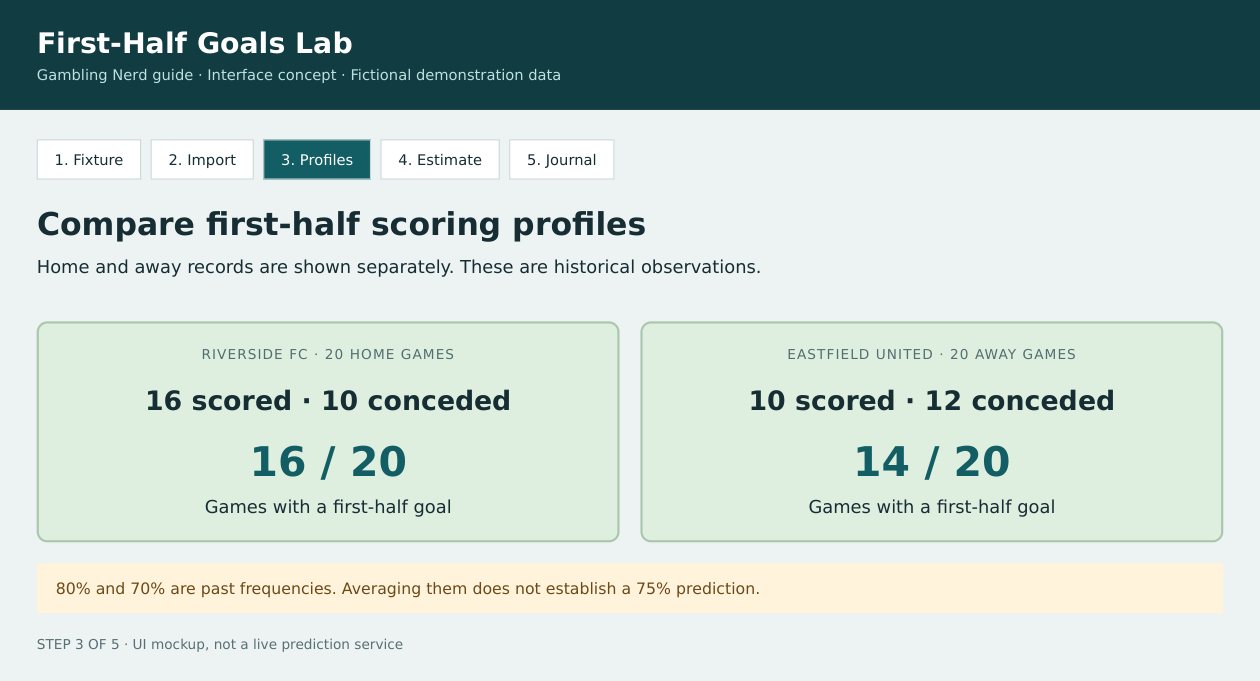
Historical frequencies describe previous matches. They should remain separate from the model’s forecast.
Step 4: Calculate an Estimate Readers Can Inspect
A useful prototype should show its workings.
Ask ChatGPT to calculate the home team’s expected first-half goals by averaging its first-half scoring rate at home with the visitor’s first-half conceding rate away. For the away team, average its away scoring rate with the home side’s conceding rate at home.
Using the fictional figures:
| Calculation | Result |
|---|---|
| Riverside scoring rate: 16 ÷ 20 | 0.80 |
| Eastfield conceding rate: 12 ÷ 20 | 0.60 |
| Estimated Riverside first-half goals: (0.80 + 0.60) ÷ 2 | 0.70 |
| Eastfield scoring rate: 10 ÷ 20 | 0.50 |
| Riverside conceding rate: 10 ÷ 20 | 0.50 |
| Estimated Eastfield first-half goals: (0.50 + 0.50) ÷ 2 | 0.50 |
| Combined expected first-half goals | 1.20 |
Next, ask ChatGPT to use a basic Poisson model to convert the combined expectation into the probability of at least one goal. The calculation is one minus the exponential of the negative combined expected goals:
Probability = 1 − e⁻¹·² ≈ 69.9%
Here, 1.20 represents the expected number of first-half goals under the model. It does not mean the match will contain exactly that many goals.
Request an explanation panel showing every input, both teams’ expected goals and the final probability. Tell ChatGPT to retain full precision internally and round only the displayed figures.
The app should describe this as an experimental Poisson baseline. It assumes independent scoring counts and does not adjust for opponent strength, lineups, tactical changes or changes in scoring intensity.
Ask ChatGPT to add calculation checks as well. A combined expectation of zero should produce a probability of zero. An expectation of 1.20 should produce approximately 0.6988057881. Missing inputs should produce no estimate.
This method is deliberately simple enough to audit. Its usefulness must be established through testing; a polished interface cannot establish forecasting skill.
Add an Odds Comparison
Once the estimate works, ask ChatGPT to add an optional field for manually entering decimal odds.
At a 69.9% estimated probability, the model’s fair odds are approximately:
1 ÷ 0.6988 = 1.43
Suppose the available odds are 1.30. Their break-even probability is:
1 ÷ 1.30 = 76.9%
The model considers a first-half goal more likely than no goal, but its estimate is still below the success rate needed to break even at that price.
This is where GamblingNerd.com’s explanation of comparing estimated probability with the available odds fits the process. Expected value depends on both the probability estimate and the price. An inaccurate estimate can make an apparently attractive bet misleading.
Tell ChatGPT to accept decimal odds greater than one and display the break-even probability, model fair odds and model-implied expected net return per unit. That last figure is calculated by multiplying the estimated probability by the decimal odds, then subtracting one.
Specify that expected return is conditional on the model being accurate. A positive figure should never be labelled a proven edge.
If no odds are entered, the app should omit the price comparison. If the estimated probability is zero, fair odds should appear as undefined. Include fields for the odds source and observation time whenever prices are recorded.
The price comparison explains why a likely outcome can still offer an unattractive return.
Step 5: Save Predictions Before Checking Results
Once the app calculates an estimate, it needs a record of what it predicted and when.
Otherwise, it becomes too easy to change the method after seeing a result and forget how uncertain the original forecast was.
Ask ChatGPT to add a prediction journal using local browser storage, with JSON export and import for backups. Browser storage can be cleared, so keep exported copies of records you want to retain.
Each saved forecast should preserve the fixture, prediction date, actual creation timestamp, model version, source details, sample sizes, unrounded probability and any observed odds.
Tell ChatGPT to keep the saved forecast unchanged. Later half-time results should go into separate settlement fields.
The journal also needs to distinguish live pre-match predictions, historical reconstructions and fictional demonstrations. A reconstruction created today must not appear to have been published before a match played years ago.
For settled records, ask the app to record an outcome of one when the combined half-time score is at least one, and zero when the score is 0–0. It should then calculate a mean binary Brier score: the average squared difference between each saved probability and its outcome.
A Brier score measures the gap between a probability and the eventual result. Lower average scores are better.
For example, a 70% forecast receives a score of 0.09 if a goal occurs and 0.49 if it does not. The measure discourages unjustified certainty while allowing forecasts to express uncertainty.
The journal preview below contains three fictional results. Its model score is slightly worse than the fixed demonstration benchmark. That is useful information, although three matches cannot establish which approach is stronger.
Save the forecast first, then add the outcome. The benchmark figures shown here are fictional demonstrations.
Test Against a Simple League Benchmark
Your model needs something sensible to beat.
Use the proportion of earlier league matches containing a first-half goal as a baseline forecast. For example, if that proportion is 68%, the benchmark assigns 68% to the fixture being tested.
Ask ChatGPT to add a chronological historical test. For every eligible fixture, it should calculate both the team model and the league benchmark using results from earlier dates only. The fixture’s own result and later matches must never enter its prediction inputs.
Both approaches should be evaluated on exactly the same fixtures. Request the sample size, date range, mean Brier scores and excluded fixtures, with an explanation of why any were omitted.
Tell ChatGPT to label the exercise as a retrospective reconstruction. A lower model Brier score means it performed better on that evaluated sample; it does not prove future performance.
Keep settings fixed during the test. If you adjust the model after reviewing its results, evaluate the revised version on a fresh, untouched period.
Use your first 30 prospective forecasts to check whether importing, saving and settling results work smoothly. Treat that as a usability trial, rather than proof of an advantage.
Over a larger sample, also inspect calibration: when the app assigns probabilities around 70%, does the event occur roughly seven times in ten? Compare groups of forecasts rather than judging the model by a memorable winner or one frustrating goalless half.
Historical half-time scores can test forecasting accuracy. Testing betting returns additionally requires trustworthy historical prices for this exact first-half market, recorded at the time you could have taken them.
Improve the App One Change at a Time
After testing the baseline, you could investigate opponent-strength adjustments, different historical windows or methods that pull small samples towards the league average.
Ask ChatGPT to save each change as a new model version and preserve the previous version for comparison. Evaluate improvements on fresh data. Adding features is worthwhile when they improve results or make the evidence easier to understand.
The app’s most useful feature may be its willingness to withhold an estimate. Missing scores, unfamiliar teams and thin samples should remain visible. A first-half goals tool becomes more informative when you can see the limits of its calculations alongside the percentage.
About the Author
Gambling Nerd is an independent gambling media website publishing experience-based reviews, guides and analysis of online casinos, sportsbooks and poker sites. Originally launched as gamblingsites.org in 2007 and rebranded as GamblingNerd.com in 2025, its US-based editorial team serves readers worldwide. Its Nerd Nook Hub explores gambling mathematics, betting systems and sports betting strategy.